How to update WordPress theme(s)?

Login to the WordPress dashboard
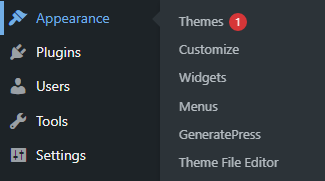
How to update WordPress theme

  • Hover over on Appearance
  • Click on Themes

How to update WordPress theme

  • If the theme has an update it will appear on the theme
  • Click on the Update now

Important: It is strongly recommended that you take a backup of your website before updating the current or running theme.

Tip: Don’t keep more than one/two themes on your WordPress system. It is best for the WordPress website’s health. Themes should be organized like the below way –

If you use a theme developed by WordPress –

  • The main theme (for example – Twenty Twenty-One)
  • And a child theme (it is optional, but a child theme helps in many ways)

if you use a third-party theme –

  • The main theme (for example – GeneratePress)
  • A child theme (it is optional, but a child theme helps in many ways)
  • And a theme developed by WordPress (if the main theme breaks for a reason then it will work as a default theme)

Leave a Comment